
Compatibility
Minecraft: Java Edition
Platforms
Supported environments


Creators
Details
Licensed Apache-2.0
Published last year
Shows when the player has too less Java memory allocated, and plays a sound when the game has finished loading.
It is fully configurable in config/loadsupport.toml.
Config 🚀
The config in config/loadsupport.toml is pretty self explainatory:
loadFinishSound = "minecraft:ui.toast.challenge_complete"
minMemory = 4.0
errorTitle = "Error: Not enough Java memory!"
errorMinMemory = "Please allocate at least {minMemory} GB of Java memory to your Minecraft instance!"
errorCurrentMemory = "You have currently {currentMemory} GB allocated."
memoryInfoLink = "https://github.com/vaporvee/LoadSupport/wiki/How-to-allocate-more-memory-to-your-Minecraft-instance"
{minMemory} and {currentMemory} get replaced by their actual values.
Planned Features 👀
- 🪛 Ingame settings (Modlist support)
- 🧩 More features letting the player know why Minecraft is not loading
Features
Directly show a warning when too less Java Memory was selected 🚨
The player doesn't need to wait just to know that they selected the wrong amount of Java Memory.
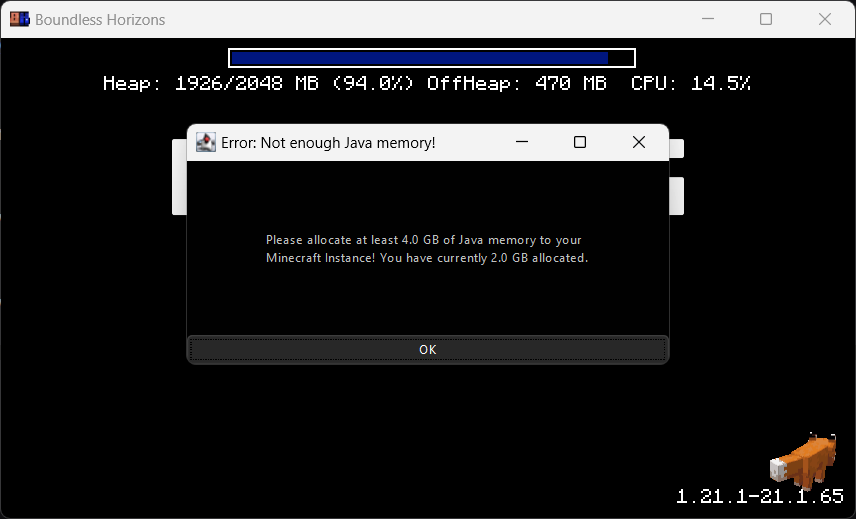
Blocks the game window🚧
Make sure the player gets the correct performance experience.
Play a sound when Minecraft finished loading 🔊
Directly know when Minecraft started when beeing in the background.